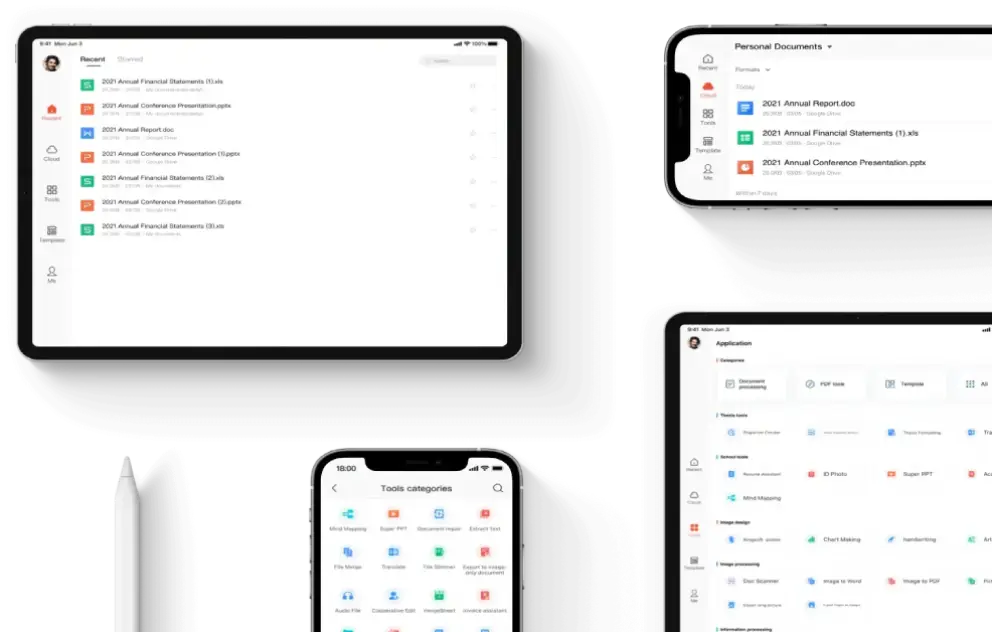
Staying organized at work is no longer a luxury; it is a necessity. With growing workloads, constant communication, and multiple file formats to manage, professionals need a reliable solution that keeps everything structured and accessible. wps has emerged as a powerful productivity suite designed to simplify daily tasks, reduce clutter, and help individuals and teams work more efficiently. From document creation to file management and collaboration, wps provides practical tools that support better organization in modern workplaces.
The Importance of Organization in the Workplace
A well-organized workflow saves time, reduces stress, and improves overall productivity. When files are scattered, versions are confusing, and collaboration tools are limited, even simple tasks can become overwhelming. Organization helps employees focus on meaningful work rather than searching for documents or fixing avoidable errors.
wps addresses these challenges by combining essential office tools into one integrated platform. Its user-friendly interface and smart features allow users to create, store, and manage documents in a structured way, making daily work more manageable and efficient.
Centralized Document Management
One of the biggest advantages of using wps is centralized document handling. Instead of juggling multiple applications for text documents, spreadsheets, presentations, and PDFs, wps brings everything together in one place. This unified environment reduces confusion and ensures that all files are easy to locate and manage.
Easy File Organization and Access
wps allows users to organize files into folders and categories that match their workflow. Whether you are managing project reports, financial data, or client presentations, you can keep everything neatly arranged. The built-in file manager helps you quickly browse, search, and open documents without switching between different tools.
Seamless File Compatibility
Workplaces often deal with multiple file formats, which can disrupt organization. wps supports a wide range of formats, including Microsoft Word, Excel, and PowerPoint files, as well as PDFs. This compatibility ensures that documents open correctly and remain consistent, reducing version-related issues and keeping your work organized.
Efficient Document Creation and Editing
Creating clear, well-structured documents is a key part of staying organized at work. wps offers powerful editing tools that help users produce professional content quickly and efficiently.
Smart Templates for Consistency
wps provides a variety of ready-made templates for reports, proposals, invoices, and presentations. Using templates ensures consistency across documents, which is essential for organized workflows. Consistent formatting makes files easier to read, review, and archive.
Advanced Editing Tools
With features like spell check, formatting styles, and layout controls, wps helps users maintain clean and structured documents. These tools reduce errors and ensure that information is presented logically, contributing to better organization and clarity.
Spreadsheet Tools for Data Organization
Handling data effectively is critical in most workplaces. wps spreadsheets offer powerful features that help users organize, analyze, and present data with ease.
Structured Data Management
wps spreadsheets allow users to sort, filter, and categorize data quickly. This makes it easier to manage large datasets, track progress, and identify trends. Well-organized data leads to better decision-making and improved efficiency.
Visual Data Representation
Charts, graphs, and tables in wps help transform raw data into clear visuals. Visual representation improves understanding and keeps information organized in a way that is easy to share with colleagues and stakeholders.
Presentation Tools for Clear Communication
Clear communication is an essential part of workplace organization. wps presentation tools help users create structured, visually appealing slides that convey ideas effectively.
Professional Slide Design
wps offers customizable themes and layouts that help maintain consistency across presentations. Organized slides with clear headings and visuals make it easier for audiences to follow the message and retain information.
Easy Content Management
Users can easily rearrange slides, update content, and reuse presentations for different purposes. This flexibility saves time and keeps presentation materials organized and up to date.
PDF Tools for Better File Control
PDF files are widely used in professional environments, but managing them can be challenging. wps includes built-in PDF tools that simplify editing, converting, and organizing PDF documents.
Editing and Annotation Features
wps allows users to highlight text, add comments, and make annotations directly on PDFs. This reduces the need for printing and scanning, keeping documents digital and well-organized.
PDF Conversion and Merging
Converting PDFs to editable formats and merging multiple files into one document helps streamline workflows. With wps, users can manage PDFs efficiently, reducing clutter and improving file organization.
Cloud Integration for Anytime Access
Modern work often requires access to files from different locations and devices. wps cloud integration ensures that documents are always available when needed.
Secure Cloud Storage
By saving files to the cloud, users can keep their documents safe and organized in one central location. Cloud storage reduces the risk of data loss and eliminates confusion caused by multiple file versions.
Cross-Device Synchronization
wps allows users to access their files from desktops, laptops, tablets, and smartphones. This flexibility ensures continuity and organization, even when working remotely or on the go.
Collaboration Features That Reduce Chaos
Team collaboration can easily become disorganized without the right tools. wps offers collaboration features that help teams work together smoothly.
Real-Time Editing and Sharing
wps enables users to share documents and collaborate in real time. Team members can view changes instantly, reducing the need for multiple file versions and long email threads.
Commenting and Feedback Tools
Built-in commenting features allow teams to leave feedback directly on documents. This keeps communication tied to the relevant content, making collaboration more organized and efficient.
Task and Time Management Support
While wps is primarily an office suite, its structured tools indirectly support better task and time management.
Organized Workflows
By keeping documents, data, and presentations well-structured, wps helps users plan tasks more effectively. Clear documentation supports better prioritization and reduces wasted time.
Faster Task Completion
With intuitive tools and minimal learning curves, wps allows users to complete tasks quickly. Faster completion means fewer delays and a more organized workday.
Customization for Personal Work Styles
Every professional has a unique way of working. wps offers customization options that help users tailor the software to their needs.
Personalized Layouts and Shortcuts
Users can adjust toolbars and settings to match their workflow. Customization reduces unnecessary steps and keeps frequently used tools easily accessible.
Language and Interface Flexibility
wps supports multiple languages and interface options, making it suitable for diverse teams and global workplaces. A comfortable interface contributes to better focus and organization.
Conclusion
Staying organized at work is essential for productivity, clarity, and long-term success. wps provides a comprehensive set of tools that help professionals manage documents, data, and collaboration in one unified platform. From centralized file management and powerful editing tools to cloud access and teamwork features, wps simplifies daily workflows and reduces workplace chaos.
By integrating wps into your routine, you can create a more structured, efficient, and stress-free work environment. Whether you are an individual professional or part of a growing team, wps offers practical solutions that help you stay organized and focused on what truly matters at work.